
This year, I’ve taken the time to do more vibe coding, follow my curiosity, and build small ideas purely for the joy of creating and learning. Some of these projects solve my own daily frustrations; others are internal tools for teams. Each project has taught me something new, but even more importantly, building has made me more confident and kept me closely involved with the design details at every stage.
I want to share what I’ve been building and the process I’ve discovered, because I believe more designers could benefit from this experience.
How I got started
Before I started building with AI, I was already making high-fidelity prototypes in Figma and Framer. I loved making an idea feel as real as possible. AI-assisted coding let me take that a step further and build real working software.
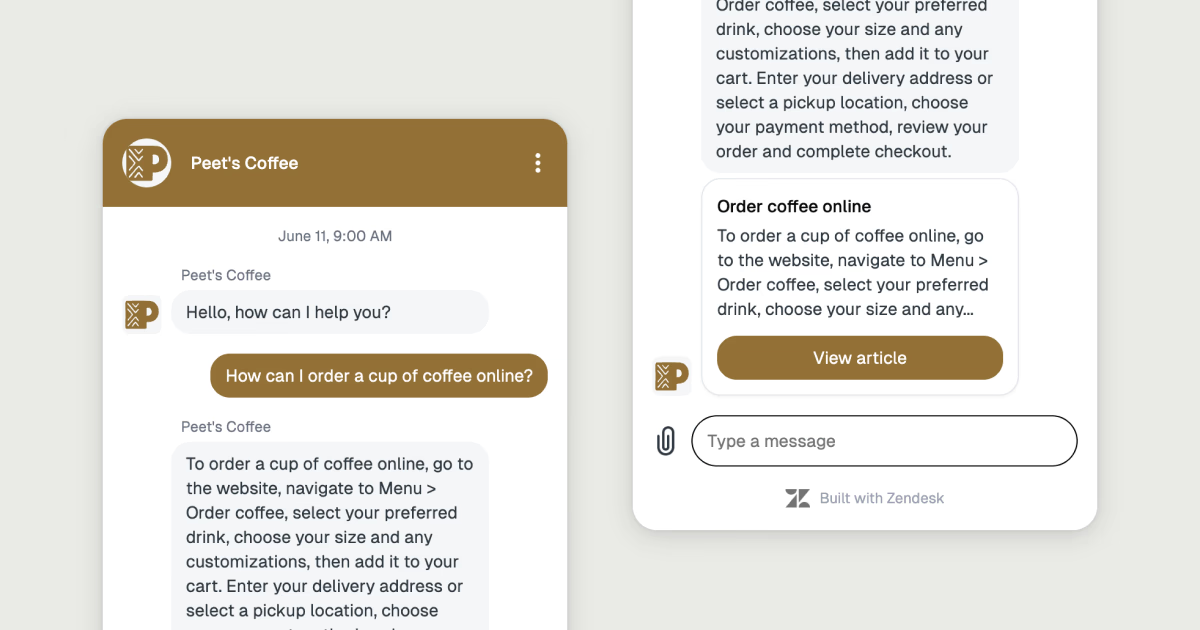
I began experimenting with AI-assisted building before this year. One early project grew out of a problem I saw at Zendesk: the Voice of the Customer team needed to show prospective clients what the Messaging Web Widget would look like with their branding, but customizing it for each conversation was time-consuming.
So, I built an internal tool that let the team adjust colors, logos, business names, taglines, and widget text, then instantly generate a branded image. Helping the team was incredibly satisfying. It made me realize how much I enjoy building tools that make a team’s work easier.
Last year, as a product designer at Google, I wanted to demonstrate an idea for a digital wellbeing audio-based educational series for young people. I used research and NotebookLM to develop lesson themes, text-to-voice tools to create a virtual speaker, and Descript to assemble the videos with captions.
Those prototypes gave people something concrete to react to. For me, that’s one of the best uses of AI in prototyping.
Personal projects
More recently, I built MD Board, an interactive canvas for Markdown to-do lists. I built it because I keep my to-do list in a Markdown file for its simplicity, but sometimes I want a broader view and a nicer-looking list.
I quickly prototyped the idea with Claude Code to test whether it would work. Once the core concept worked, I designed the interface in Figma and brought those designs back into Claude Code to build out the app. The result is a self-contained app that runs locally with your files.
I’ve also kept pursuing ideas sparked by small, specific needs. This year, I’ve built:
- Minimalist Mac time tracker: I needed a simple way to track client hours, without the hassle or recurring fees of a full service. I built a lightweight app with a timer that logs hours directly to a Google Sheet.
- Daily Design Gold: I wanted a place on UI Goodies to share side projects, visual finds, and inspiring work. I created a grid-based gallery and a Chrome extension to collect items, which the site displays through a custom Framer component. See it: https://uigoodies.com/daily-goods
- Cooks in the Comments: When I make a recipe from The New York Times Cooking, I read the comments for useful tweaks from other cooks. To save time, I built a Chrome extension that reviews the most helpful comments and lets me remix a recipe with the best suggestions in one click. It uses on-device AI, so the comments stay private.
- Google Docs formatting extension: I often draft outside Google Docs and then fix formatting after pasting. I built an Apps Script extension that automatically matches pasted text to the document’s default styles.
You can see more of these projects here: https://jesseddy.com/vibe-coding
The process I keep coming back to
After several projects, I’ve settled into a workflow:
- Start with the smallest working version. I use AI to test the core idea: can I build a basic version? At this stage, I explore feasibility and gauge my interest in pursuing the idea further.
- Design the experience in Figma. Once the core idea works, I step away from the code and design the UI. I don’t design in code because it takes too long to get exactly what I want. I can do that quickly in Figma.
- Build from the design. I bring my Figma designs into an AI coding tool and iterate on the implementation, testing, and refining as I go.
MD Board followed this pattern, as did my time tracker. Getting a rough version working early gives me something tangible to respond to, so I can refine the experience with care and attention to detail.
The best part is that ideas don’t feel out of reach anymore. I can just dive in, see what works (and what doesn’t), and figure out the next step as I go. Sometimes I end up with a finished app. Other times, just tinkering and learning is enough.
Your idea can be beautifully specific
Seeing what other people are building always sparks new ideas for me. That’s why I’ve started collecting inspiring examples. I share these vibe-coded projects on UI Goodies, and some of my favorites begin with personal solutions.
- Trev turned a 24-page Word itinerary into a travel app the day before leaving for Switzerland. He and his travel companions used it throughout their nine-day trip because it was easier to have the plans in their pockets.
- Linus made a searchable 3D version of his bookshelf, with links to Goodreads.
- Yan made playful interactive experiments with Claude, exploring how animation and interaction can make something feel alive.
If you’ve had a small idea lingering in the back of your mind, pick the part you’re most curious about and see if you can make it work. It doesn’t have to become a product; the first version might simply reveal your next step.