I don’t often use AI only to design UI components. I find it challenging to get exactly what I want using this process, and I’ve struggled to get the fine-tuned control I want over each detail.
But AI is quickly becoming part of how we design interfaces, so I decided to spend some time testing it more intentionally. After seeing someone build components with Astra in Codex, I was inspired to try it myself.
I wanted to see what Astra could come up with if I set a few ground rules and constraints, but still gave it space to make its own choices.
I also wanted to explore some of the great resources for shaders, sound, and transitions that are now so easy to bring into UI work.
As an experiment, I built a handful of UI components to see what Astra could do. In the rest of this article, I’ll walk through my process and how I arrived at the results. See the components.
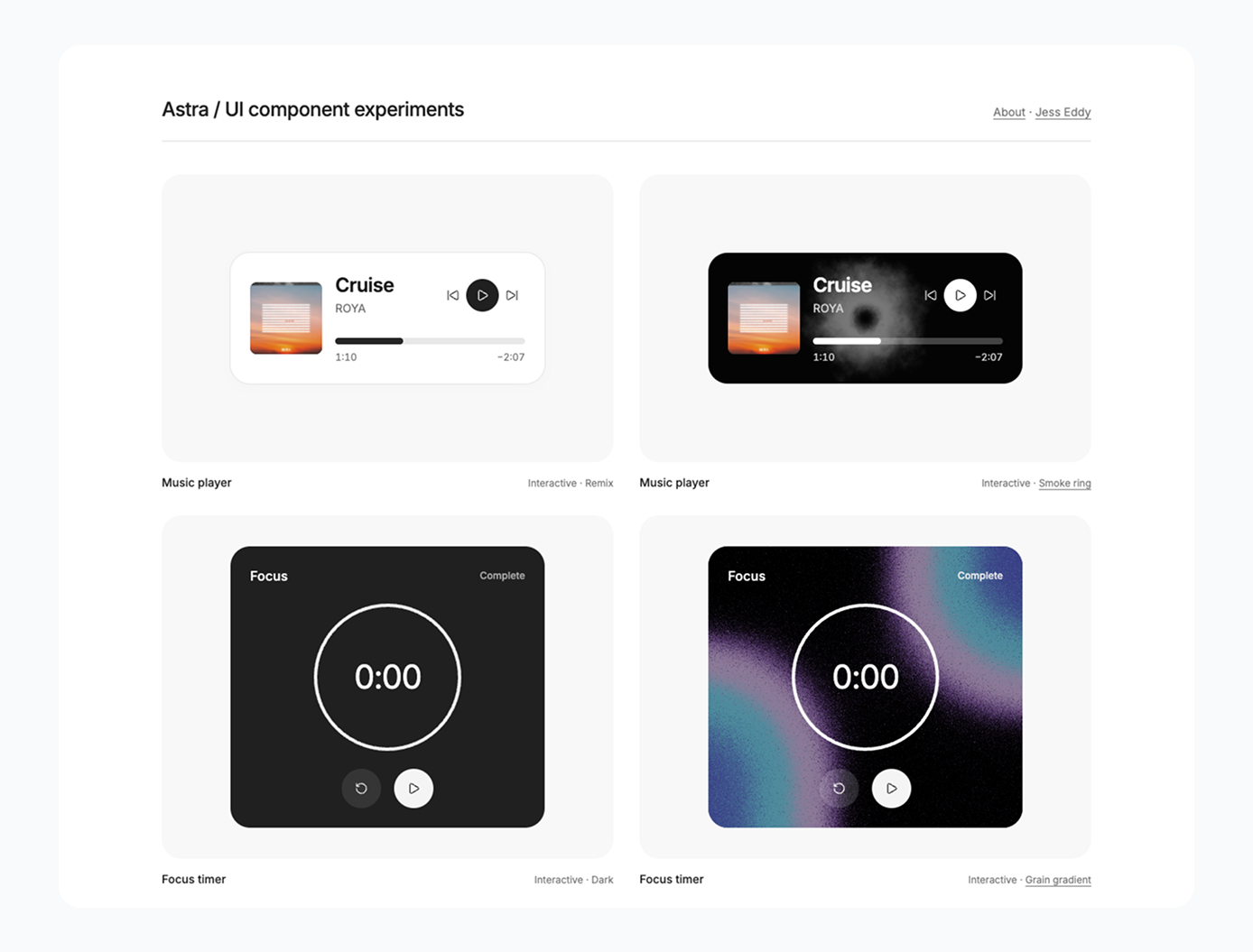
Paid members can access the full set of design rules and component prompts here.
 Jess Eddy
Setting the foundations
To create consistent components, I started by defining the basics. I identified a color palette (Radix), an icon set (Lucide), and a couple of font families to give the components a shared look and feel.
I also established some fixed values
- An 8px base grid
- A 24px outer corner radius
- A 24px inset for text and controls
- No more than three font sizes and three weights per component
- White surfaces by default, with near-black primary elements and neutral greys for secondary information
These rules gave me a starting point to see how Astra might produce different components consistently, without forcing them into the same layout.
I also set out some guidance for hierarchy, grouping, imagery, and controls: pick one focal point, keep related info together, dial back the emphasis on supporting content, and keep icon proportions consistent.
Leaving layout decisions to Astra
In the individual prompts, I described what the component needed to communicate and do. I gave broad direction on its form, then left the detailed arrangement to Astra.
For example, this was the travel-budget prompt:
Create a compact travel budget widget using the shared UI component rules. Give it a footprint slightly taller than it is wide.
Show A$2,900 spent of A$4,800 on day 3 of 6. Break the budget into four categories, each with an icon, amount spent, allocation, and proportional progress bar: Stays A$1,400 / A$1,600, Flights A$900 / A$900, Food A$420 / A$1,300, and Activities A$180 / A$1,000. Keep the total and category amounts consistent.
The prompt spells out exactly what content and indicators to include, and gives a target size and shape for the component. But it leaves the details, like where each element goes, how things are grouped, and what gets the most visual emphasis, up to Astra, as long as those choices fit within the shared rules.
Finding that balance was core to the experiment. I wanted enough consistency to compare the components side by side, but also enough freedom for Astra to work with different types of content. After all, an editorial card and a budget widget don’t need to follow the same rules.
Building the rules through iteration
I shaped the rules as I went, building components, seeing what worked, and adjusting along the way.
The whole process was pretty iterative: I’d make a component, see what needed fixing, and then sharpen the instructions. Over time, the rules got more detailed about alignment, spacing, typography, and how icons relate to their containers.
Astra is expensive!
I ran out of Codex credits way faster than I expected; Astra burns through tokens quickly. Once I had the rules in place, it was better, but it’s still an expensive way to create UI components.
Exploring color, imagery, sound, and motion
I customized some components along the way, like changing the weather widget’s background color; this is easy to do in the moment and on a case-by-case basis.
The default visual rules gave everything a cohesive starting point, but I also made room for intentional exceptions. I wanted to play around with shaders, sound, and motion, and made some custom implementations using:
These were all easy to implement by linking to the resources; some require a simple installation via Terminal.
The real unlock
I was fairly impressed by the UI components Astra produced. More time spent refining them could improve the results, though they still felt quite generic.
What interested me most was using Paper’s Chrome extension to copy a component from the browser into Paper, where I could edit it manually. That opens up another way to start designing: generate a component in code, then bring it into a design tool to refine the details yourself.
Figma has a similar extension, although I couldn’t get it working on this page.
Even though the components still look a little generic, this experiment made me more interested in using AI as a design starting point. Shared rules helped establish consistency, while reviewing and refining the results remained a design task. Being able to bring a coded component into Paper (or Figma) and keep working on it made that process feel especially useful. There’s more to explore here.